

How to Identify a Fake Online Store Before You Pay
In the evolving landscape of e-commerce, distinguishing between a legitimate merchant and a fraudulent operation is no longer optional—it is a necessity. As online shopping scams become more sophisticated, often leveraging AI-generated content to mimic real brands, your ability to recognize red flags determines whether you keep your money or lose it. This guide provides a rigorous framework for verifying sellers before transaction.
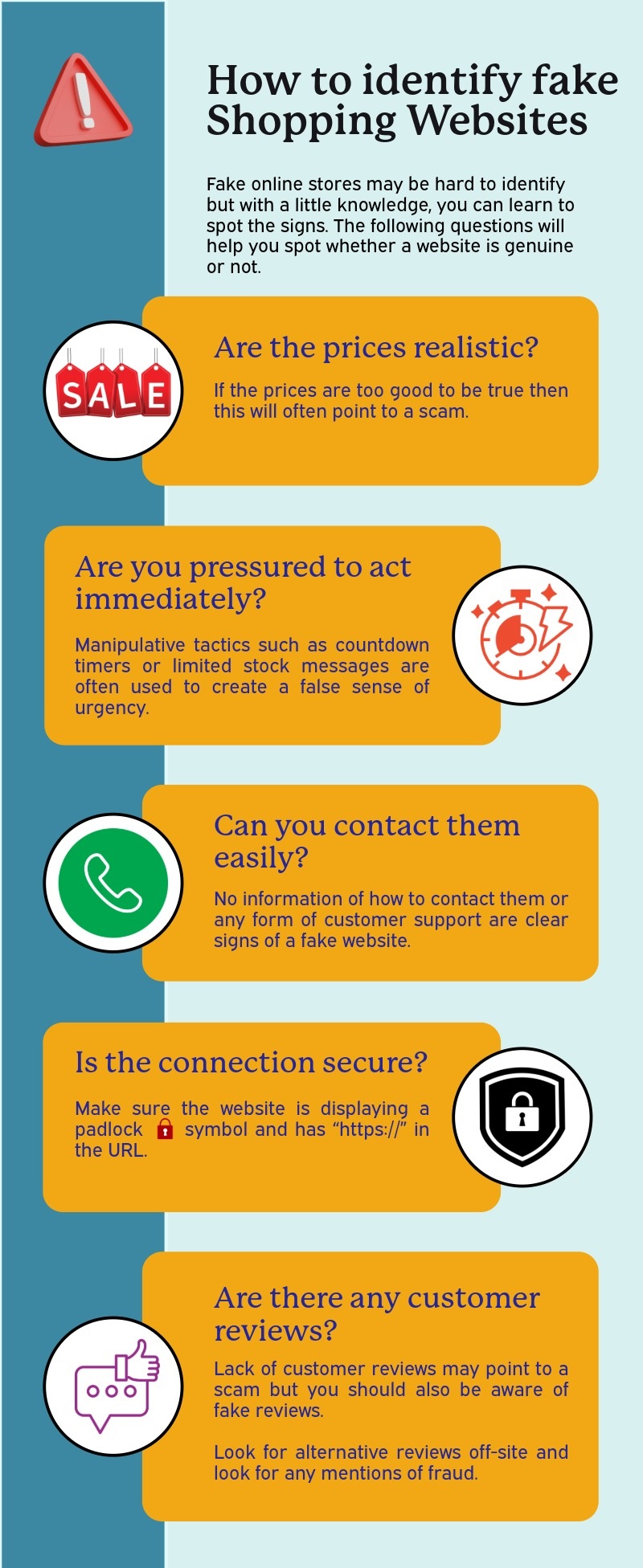 Image Source: Web. Copyright claims: claims@theusefulindex.com — We will remove it in 24 hours.
The Anatomy of a Scam Site
Understanding what constitutes a fake online store begins with recognizing the infrastructure behind the fraud. Most fraudulent sites rely on stolen templates, copied product descriptions, and non-existent business entities. When you encounter suspicious discounts or an inability to find contact information, these are not minor glitches; they are primary indicators of intent to defraud.
According to security research from 2026, scammers now utilize dynamic content generation to bypass basic filters. However, fundamental checks regarding domain registration and payment methods remain the most effective defense.
Step 1: Domain and Business Verification
Before entering any site, you must validate its existence beyond the URL bar. A legitimate business invests in transparency; a scammer operates in the shadows.
Check the Domain Age
Scammers often register domains for short periods to avoid blacklisting. Use a WHOIS lookup tool to check domain registration dates. If the site was created less than 90 days ago, exercise extreme caution. Legitimate retailers typically have established digital footprints.
Inspect the URL Structure
Phishing sites frequently mimic popular brands by using slight misspellings or hyphenations (e.g., amazon-prime-deals.com). Always verify that the domain matches the brand’s official name exactly. Look for “https://” but remember: an SSL certificate does not guarantee legitimacy; it only ensures encrypted data transmission.
Locate Business Information
Legitimate stores display physical addresses, phone numbers, and tax IDs. If you cannot find a “Contact Us” page or a legitimate business registration number, the site is likely a fake online store. Experian advises looking beyond the URL to find pages detailing company policies and history.
Step 2: Analyzing Policies and Contact Details
A crucial indicator of credibility is the presence of functional customer service channels. Fraudulent sites often hide behind generic forms or broken links.
| Feature | Legitimate Store | Fake Online Store Signs |
|---|---|---|
| Contact Info | Physical address, phone, email on footer/contact page. | Only a “mailto” form, no physical address, or generic info. |
| Return Policy | Clear terms with deadlines and shipping costs specified. | Vague language (“asap”), missing policy, or “no returns.” |
| Privacy Policy | Detailed explanation of data usage and compliance. | Missing, copied from another site, or empty. |
| Social Media | Active accounts with consistent branding and engagement. | Broken links, inactive profiles, or mismatched logos. |
If a retailer demands payment via wire transfer, cryptocurrency, or gift cards rather than credit cards or PayPal, this is a major red flag for online shopping scams. Credit card companies offer chargeback protections; scammers specifically target alternative payment methods to avoid liability.
Step 3: Evaluating Content and Pricing
Scammers rely on urgency and value propositions that are too good to be true.
Suspicious Discounts
A discount of 80% off or “50% off everything” is a common tactic. While sales occur, consistent deep discounts across all categories often indicate liquidation of inventory from a previous scam attempt or stolen stock. Verify if the price matches other reputable retailers.
Copied Content
Use a reverse image search (like Google Lens) on product photos. If images appear on multiple unrelated sites without attribution, the content is likely scraped. Additionally, check for grammatical errors or awkward phrasing in descriptions. AI-generated text often lacks the specific nuance of human copywriters and may contain subtle hallucinations about product features.
Product Availability
If you add an item to your cart but the checkout page fails to load, or if the product is marked “In Stock” but unavailable at checkout, investigate further. Some scammers use this to harvest credit card information before redirecting you to a different site.
Step 4: Independent Reviews and Reputation
Never rely solely on reviews hosted on the merchant’s website; these can be easily manipulated. How to identify fake websites often involves cross-referencing external sources.
- Third-Party Reviewers: Check Trustpilot, SiteJabber, or the Better Business Bureau (BBB). Look for patterns of negative feedback regarding non-delivery or poor customer service.
- Social Proof: Search the brand name on social media platforms. A legitimate company will have a history of interaction with customers.
- Domain Reputation Tools: Services like ScamAdviser analyze domain reputation and user reports. If a site has a low trust score, proceed with caution.
Step 5: Payment Protection Mechanisms
The safest way to shop is through payment processors that offer buyer protection.
- Credit Cards: Always use credit cards for online purchases if possible. They generally offer the strongest fraud protection under the Fair Credit Billing Act.
- PayPal Escrow: Use PayPal or similar services where funds are held until you confirm receipt of goods.
- Avoid Direct Bank Transfers: Wire transfers and direct bank debits are irreversible. Once money leaves your account, there is no recourse.
What to Do If You Suspect a Scam
If you have identified a scammer or received a phishing email, do not wait for the transaction to complete. Take immediate action to mitigate damage.
- Stop Payment: Contact your bank immediately if a payment was authorized but not yet processed.
- File a Report: Submit a complaint to the Federal Trade Commission (FTC) at reportfraud.ftc.gov or contact your local consumer protection agency.
- Freeze Your Accounts: If personal information (like SSN or bank details) was entered, consider placing a fraud alert on your credit reports with Equifax, Experian, and TransUnion.
- Document Everything: Save screenshots of the site, order confirmations, and correspondence. This evidence is vital for chargeback disputes.
Key Takeaways: Decision Framework for Safe Shopping
To reinforce this guide, use the following checklist before clicking “Buy”:
- Domain Check: Is the domain registered to a legitimate business?
- Contact Info: Can I find a physical address and phone number?
- Payment Method: Am I using a credit card or PayPal with buyer protection?
- Reviews: Do independent reviews confirm the site’s legitimacy?
- Policies: Is there a clear return policy and privacy statement?
No information without value. By applying these verification steps, you significantly reduce your risk of falling victim to modern online shopping scams. Remember, if an offer seems too good to be true, or if the website feels “off,” trust your instincts and walk away.